- Multi-screen counts cameras; stitching understands a space.
- For large continuous coverage, choose video stitching (up to 156 channels, 200 ms).
- Existing cameras can be reused — no replacement required.
1. Three Ways to Show Many Cameras on One Wall
When a control room must watch dozens of cameras, there are three common approaches — and they solve very different problems.
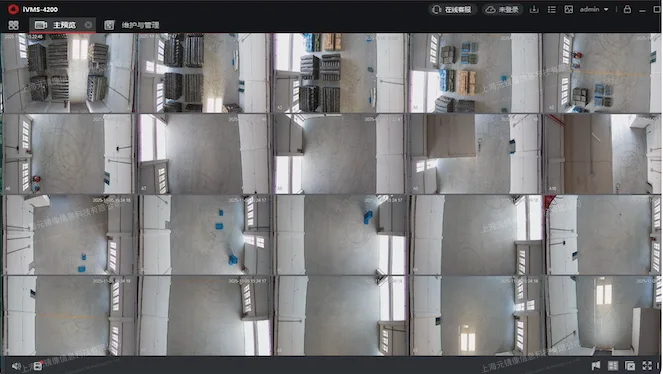
- Multi-screen wall (分屏) — each camera gets its own tile on the video wall.
- 360° / panoramic camera (全景相机) — one physical camera with multiple sensors covers a wide area by itself.
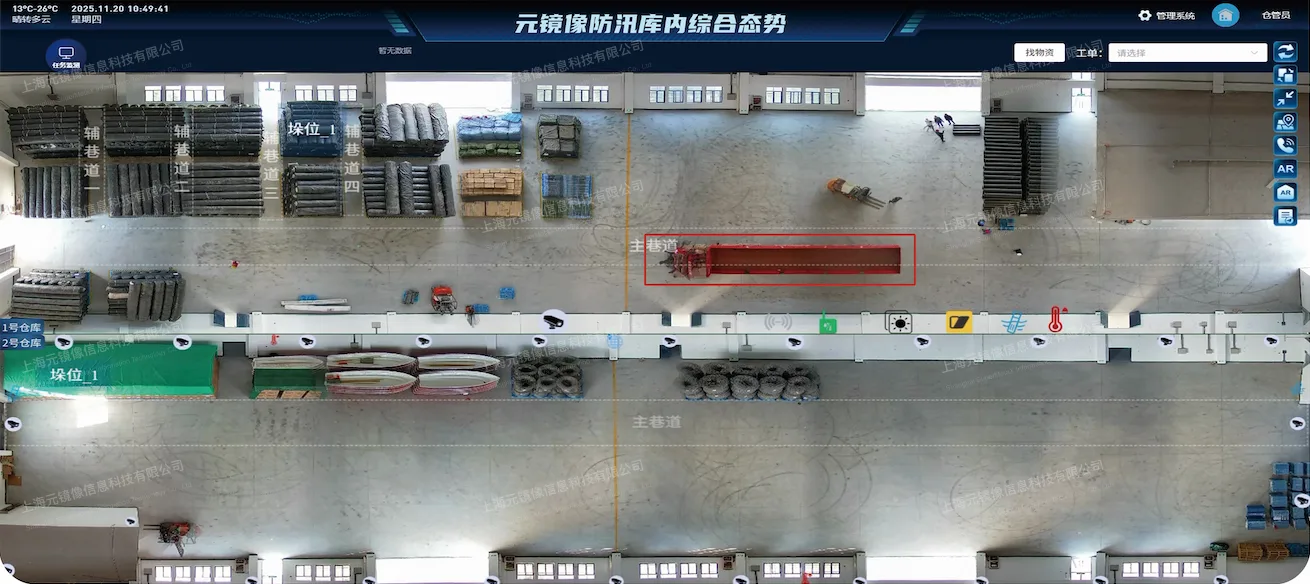
- Video stitching (全景拼接) — software fuses many ordinary cameras into one continuous, seamless panoramic image.
| Dimension | Multi-screen | 360° camera | Video stitching |
|---|---|---|---|
| View | Fragmented tiles | One wide view (single point) | One continuous panorama |
| Coverage | Limited by human attention | Limited to one vantage point | Arbitrarily large area |
| Blind spots | Gaps between tiles | Behind obstacles | Eliminated by fusion |
| Cameras reused | Yes | No (new hardware) | Yes (existing cameras) |
| Latency | Low | Low | Within 200 ms |
The key insight: multi-screen shows many feeds, while stitching shows one unified scene. They serve opposite goals — multi-screen for counting cameras, stitching for understanding a space.
2. When Each Approach Wins
Choose multi-screen when
You need to monitor many independent locations, and operators can handle switching attention. It is cheap and simple, but it does not reduce blind spots or cognitive load.
Choose a 360° camera when
You need wide coverage from a single mounting point and cannot run new cables. It is easy to install but is limited to one vantage point and cannot span a long production line or corridor.
Choose video stitching when
You need continuous coverage of a large space — a long production line, a port yard, a corridor, a vessel perimeter. Stitching reuses existing cameras, eliminates gaps, and gives operators one spatially-correct picture. The SuperMetaX PanoStitch Live stitches up to 156 channels on a single server with end-to-end latency within 200 ms.
3. A Quick Decision Guide
| Scenario | Recommended | Why |
|---|---|---|
| Independent rooms, few cameras each | Multi-screen | Simple, no fusion needed |
| Single vantage point, no cabling | 360° camera | One-device install |
| Long production line / corridor | Video stitching | Continuous spatial coverage |
| Port yard / large open area | Video stitching | Reuse existing cameras, no blind spots |
| Vessel perimeter | Video stitching | 360° bird's-eye from many hull cameras |
4. Frequently Asked Questions
What is the difference between video stitching and a regular multi-screen display?
Multi-screen shows independent tiles; stitching seamlessly merges many feeds into one continuous panoramic image, eliminating the gaps and blind spots of a multi-screen layout.
Can I use my existing cameras for stitching?
Yes. Any camera exposing RTSP, ONVIF or GB28181 can join the stitching pipeline — no camera replacement is required.
What is the stitching latency?
End-to-end latency is within 200 ms and does not vary with channel count, meeting live monitoring and command requirements.
Which is cheaper — a 360 camera or stitching?
For a single point, a 360° camera is cheaper. For a large space already covered by cameras, stitching is cheaper because it reuses existing hardware instead of adding new devices.
Can stitching and multi-screen coexist?
Yes. A common setup stitches the overview and keeps individual channels for drill-down.
How many channels can one server stitch?
Up to 156 channels on a single server, with end-to-end latency within 200 ms.